


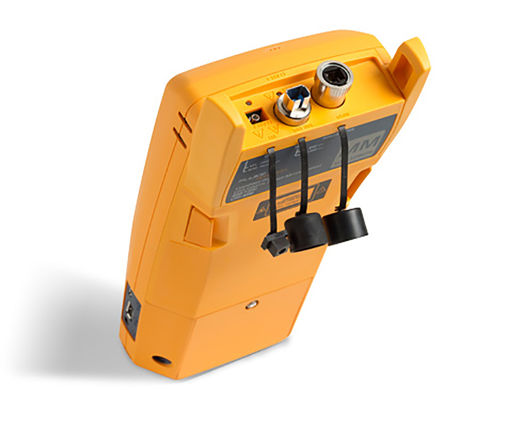
Fluke Networks CFP-SM-ADD
Singlemode modules add on kit for Versiv
Rent or Lease
Fluke Networks - CFP-SM-ADD
The Fluke Networks CFP-SM-ADD CertiFiber Pro Optical Loss Test Set improves the efficiency of fiber optics certification. The Taptive user interface simplifies set-up, eliminates errors and speeds troubleshooting. A set reference wizard ensures correct reference setting and eliminates negative loss errors. Built on the future-ready Versiv platform, CertiFiber Pro Optical Loss Test Set (OLTS) provides merged Tier 1 (Basic) / Tier 2 (Extended) testing and reporting when paired with OptiFiber Pro module.
CFP-SM-ADD Product Highlights
- Versiv enables users to accomplish more than ever with a cable tester, accelerating every step of the testing process
- ProjX management system eases tasks from initial set-up of a job to system acceptance. It eliminates redundant steps, and ensures that all tests are completed correctly the first time, and every time
- Taptive user interface puts advanced data analysis and easy set-up and operation at the fingertips of technicians of all skill levels
- LinkWare PC management software provides unmatched analysis of test results and professional test reports
- LinkWare Live allows you to manage results and the testing process from your smart devices
- Performance:
- Three-second Autotest optical loss measurement of two fibers at two wavelengths with distance measurement and optical loss budget calculation
- Provides automatic Pass/Fail analysis to industry standards or custom test limits
- Identifies incorrect test procedures resulting in negative loss readings
- Interchangeable power meter adapters available for all typical connector types (SC, ST, LC and FC) to enable the most accurate 1-jumper reference method
- Built-in visual fault locator for basic troubleshooting and polarity determination
- Dual wavelength measurement capability on a single fiber allows the tester to be used in applications that require only one fiber link
- Compliant with TIA-526-14-B and IEC 61280-4-1 Encircled Flux requirements with no additional equipment or procedures
- Integrated Wi-Fi allows you to easily upload results to LinkWare Live
- Standards:
- Allows combined OLTS Tier 1 (basic), OTDR Tier 2 (extended) certification, end-face inspection and reporting when paired with OptiFiber™ Pro OTDR
- Set reference wizard verifies test reference cords (TRCs) per ISO/IEC 14763-3 and eliminates negative loss errors
- Certify fiber optic endfaces to industry standards – IEC 61300-3-35
Fluke Networks & TRS-RenTelco
TRS-RenTelco is a proud partner of Fluke Networks and offers a wide range of rental, purchase and leasing solutions designed specifically to meet the evolving needs of the electronic testing industry. Our close relationship with Fluke Networks allows us to ensure we have the right Optical Test solution for your job.
Renting Optical Test
With TRS-RenTelco renting Optical Test equipment has never been easier. Enjoy same-day shipping, lease, and finance options on our inventory of over 5000 electronic testing equipment rentals. As one of North America’s largest test equipment rental providers, it is our mission to support the endeavors of our clients no matter how big or small with reliable expertise, excellent customer service, accuracy, and speed.
Additional Information
Manufacturer Home Page | Fluke Networks.
- Configurations
- Resources
- FAQsAI
Base Model
Standard Rental Accessories*
* Leased or Buy Used product accessories will be confirmed with quote.
-
Barrel Simplex LC
Qty: 2 -
Adapter LC
Qty: 2 -
Jumper Simplex LC - SC Singlemode Yellow 2 m
Qty: 2 -
Jumper Simplex LC - LC Singlemode 2 m Yellow
Qty: 2 -
Adapter SC Interchangeable
Qty: 2 -
Module Power Meter
Qty: 2 -
Case Patch Cable
Qty: 1
*This item has already been added to your cart. Check your cart for quantity and availability.
Base Model
Standard Rental Accessories*
* Leased or Buy Used product accessories will be confirmed with quote.
-
SC/LC SM test reference cord (TRC), 2M (SRC-9-SCLC)
Qty: 2 -
LC/LC SM test reference cord (TRC), 2M (SRC-9-LCLC)
Qty: 2 -
Module Power Meter
Qty: 2 -
Barrel Simplex LC
Qty: 2 -
Adapter LC
Qty: 2 -
Adapter SC Interchangeable
Qty: 2 -
Case Patch Cable
Qty: 1
*This item has already been added to your cart. Check your cart for quantity and availability.

Datasheet - CertiFiber Pro Optical Loss Test Set
User Manual - Fluke Networks VERSIV2

Video - FLUKE OptiFiber Pro OTDR Fiber Optic Tester with SmartLoop Bi-Directional Averaging
Video - Fluke Networks CertiFiber Pro OLTS Unboxing (Part 1)
Video - Fluke Networks CertiFiber Pro OLTS Setup Part 1 (Part 2)
Video - Fluke Networks CertiFiber Pro OLTS Setup Part 2 (Part 3)
Video - Fluke Networks CertiFiber Pro OLTS Running a test (Part 4)
Video - Fluke Networks CertiFiber Pro OLTS Creating a Report (Part 5)
Content is AI-generated. Verify critical details with manufacturer-provided resources.
What is the Fluke Networks CFP-SM-ADD add-on kit and what is it used for?
The Fluke Networks CFP-SM-ADD is the CertiFiber Pro singlemode modules add-on kit for the Versiv cabling certification platform. It enables Tier 1 singlemode fiber certification by measuring optical loss and length so you can prove compliance to project limits and deliver acceptance documentation. It is commonly rented for new singlemode installs, datacenter cross-connect work, campus backbones, and any closeout package that requires standards-based loss testing with professional reporting.
What does Tier 1 singlemode fiber certification cover on CertiFiber Pro?
Tier 1 certification uses an optical loss test set to validate end-to-end link performance. CertiFiber Pro measures insertion loss at the required wavelengths, verifies length, and produces pass or fail results against the selected limit. Because it is part of the Versiv system, it also supports consistent naming and job tracking so large projects can be certified without losing track of which links are complete and which need rework.
Which wavelengths and distances are supported with the singlemode kit?
The singlemode source uses Fabry-Perot laser diodes at 1310 nm and 1550 nm. The power meter supports 850 nm, 1300 nm, 1310 nm, and 1550 nm and uses an InGaAs detector. Maximum length measurement for singlemode is listed at 130 km, with length measurement accuracy of plus or minus 1.5 m plus plus or minus 1 percent of length. Nominal singlemode output power is specified at greater than or equal to minus 4 dBm.
How do reference methods and test reference cords impact loss accuracy?
Accurate loss testing depends on setting a clean, correct reference and using the right reference method for the standard or customer requirement. CertiFiber Pro guides technicians through setting a reference so the power meter and source align to the chosen method, and it stores the setup with the project. Use quality test reference cords that match your connector type and keep them clean. Worn or contaminated cords can cause unstable readings and false failures, especially on low loss links.
How do ProjX, the Taptive interface, and LinkWare help with job closeout?
CertiFiber Pro is designed to reduce mistakes in the field. ProjX lets you load project settings, limits, and naming ahead of time, then track completion as the team tests. The Taptive touchscreen interface simplifies setup so newer technicians can test consistently. LinkWare PC produces customer-ready reports and consolidates results. With LinkWare Live, teams can manage projects across sites and keep results centralized for review and export.
Does CertiFiber Pro require recalibration, and what interval is typical?
The power meter module lists a re-calibration period of 1 year. If you work under a quality program that requires traceable calibration, keep the current certificate with the job records. Even with valid calibration, daily best practice is to set a fresh reference for each project or when switching cord sets, and to inspect and clean connectors to avoid drift caused by contamination.
What wavelengths does the CertiFiber Pro singlemode module test at, and does it meet Encircled Flux requirements?
The CertiFiber Pro singlemode module tests at 1310 nm and 1550 nm using Fabry-Perot laser diode sources, which are the standard wavelengths for singlemode fiber certification per ANSI/TIA and ISO/IEC standards. The singlemode module delivers output power of at least -4 dBm with power measurement uncertainty less than plus or minus 5% plus or minus 32 pW, and measurement linearity within plus or minus 0.1 dB. It is fully compliant with TIA-526-14-B and IEC 61280-4-1 Encircled Flux launch condition requirements with no additional equipment or procedures needed.
What should I do if a singlemode link fails the loss test on CertiFiber Pro?
Inspect and clean both ends of the link and your reference cords, then re-set the reference using the same cord set you will use to test. Confirm the selected limit matches the application and connector count, and verify the correct wavelengths are being tested. If loss remains high, isolate by swapping one cord at a time to rule out a bad jumper, then check for tight bends, damaged cable, or poor terminations. If you need event-level location of a fault, add an OTDR module such as OptiFiber Pro for Tier 2 analysis.


